Avoiding Course Creation Tech Fatigue
If you’re launching an online course in 2026, you’ve probably seen the promise: “Start for just $39/month with our easy-to-use platform!”
It sounds like a no-brainer. Low risk, full control, and you can upgrade later when you’re making money.
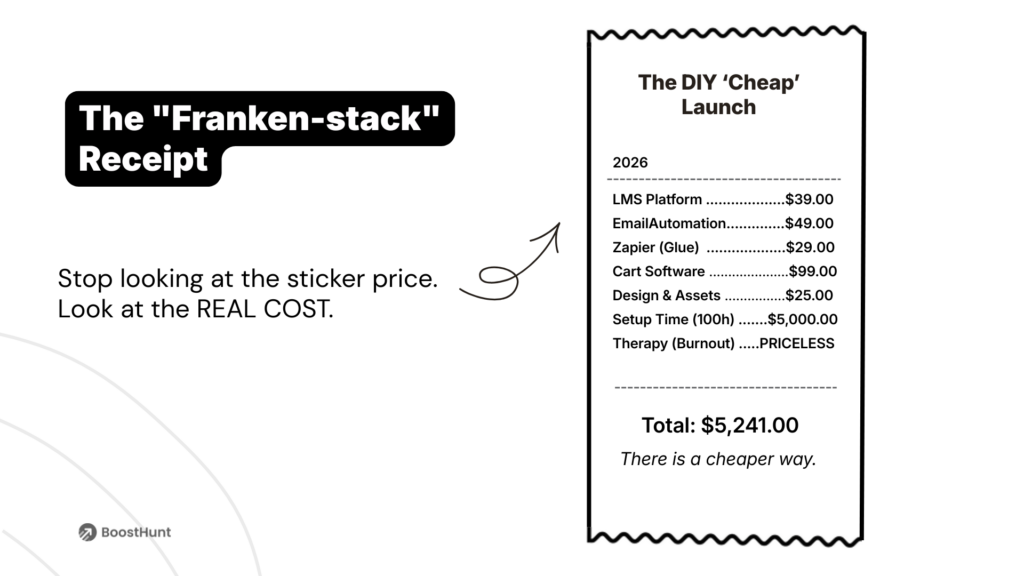
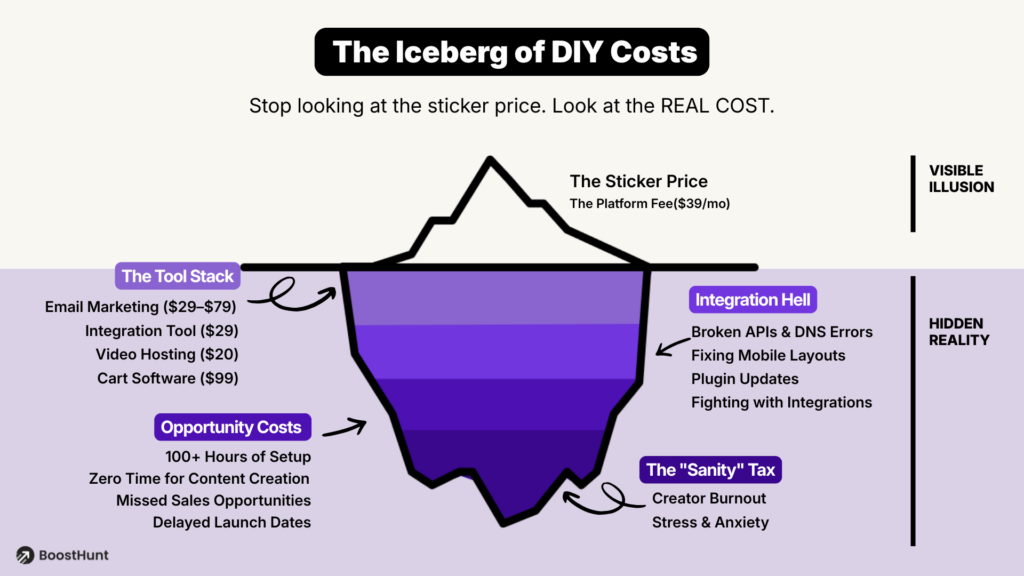
But here’s what the pricing pages don’t tell you: that $39 is just the entry fee. The real cost of running a professional course business on a “cheap” platform is often 5–10x higher—and it’s not just about money.
After spending a decade running a UX/UI design studio and helping dozens of small business owners, I’ve seen firsthand how overlooked expenses can derail even the most passionate projects. What starts as a simple subscription often snowballs into a mountain of paid add-ons, broken integrations, and lost weekends. Creators start with a lean setup, then slowly accumulate a patchwork of tools, subscriptions, and workarounds that drain both their budget and their energy.
This isn’t a rant against DIY platforms. It’s a realistic cost analysis—so you can make an informed decision before you’re six months in, burned out, and wondering where your profit went.
The Promise vs. The Reality
What You See on the Pricing Page
Most popular course platforms follow a similar model:
- Teachable Basic: $39/month (7.5% transaction fee on the Basic plan; 0% on Pro and higher)
- Thinkific Basic: $49/month (0% transaction fees)
- Kajabi Basic: $149/month (all-in-one, 0% fees)
At first glance, Teachable or Thinkific look like the smart choice for beginners. Low monthly cost, instant setup, and you keep most of your revenue.
What Actually Happens After Month 1
Here’s the reality: an LMS (Learning Management System) is just a hosting bucket. It stores your videos and delivers them to students. But to actually sell your course and keep students engaged, you need a full marketing and delivery ecosystem.
That’s where the hidden costs start piling up.
The Hidden Costs of DIY Platforms
The Cost Breakdown: From $39 to $300+/Month
Based on a 2025 analysis by DDIY.co and CustomerHub, here’s what most creators end up paying once they add the tools needed to run a real business:
| Tool Category | Why You Need It | Typical Cost | Examples |
|---|---|---|---|
| Course Platform | Host and deliver videos | $39–$149/mo | Teachable, Thinkific, Kajabi |
| Email Marketing | Automations, sequences, segmentation | $29–$79/mo | Kit (formerly ConvertKit), ActiveCampaign, MailerLite |
| Checkout/Cart | Order bumps, upsells, A/B testing | $99–$297/mo or $495 one-time | SamCart, ThriveCart |
| Automation Glue | Connect tools that don’t talk to each other | $20–$50/mo | Zapier, Make (Integromat) |
| Landing Page Builder | High-converting opt-in and sales pages | $29–$97/mo | Leadpages, Unbounce, ClickFunnels |
| Analytics | Track funnel performance beyond basic reports | $0–$50/mo | Google Analytics + heatmaps (Hotjar, Clarity) |
| Community Platform (optional) | Member engagement and retention | $39–$99/mo | Circle, Mighty Networks |
2026 hidden costs online course platforms breakdown table showing Teachable Kajabi Thinkific total monthly expenses.
Total monthly cost: $156–$721/month (not including transaction fees, payment processing, or your time)
In reality, even if you skip the “nice-to-haves,” you’re realistically looking at $200–$350/month to run a professional course business on a basic DIY stack.
The “Integration Tax”: The Hidden Cost Nobody Talks About
Money is one thing. But there’s a second cost that’s harder to quantify: your time and mental energy.
The Franken-Stack Problem
When you piece together 4–6 different tools, you create what we call a “Franken-Stack”—a fragile system held together by API connections, Zapier workflows, and crossed fingers.
Here’s what that actually looks like day-to-day:
- API failures: One tool updates, and suddenly your welcome emails stop sending
- Broken automations: A student pays, but their login credentials never arrive
- Data silos: Your email list doesn’t sync with your course platform, so you manually export/import CSVs
- Support hell: When something breaks, you have 5 different support teams pointing fingers at each other
That’s not sustainable. And it’s a major contributor to creator burnout.
Why Your “Cheap” Stack Is Actually Expensive
This is exactly the kind of LMS integration hell that quietly destroys launches — the same one I broke down in detail here: How to Launch Your Course Without Integration Hell in 2026.
Beyond the dollars, when you’re constantly firefighting tech issues, you’re not just losing time. You’re losing the energy and creativity that should be going into your students.
A November 2025 article in Forbes by Ian Shepherd highlights a mental health crisis: 62% of creators report experiencing burnout, primarily driven by financial instability and the pressure to perform. In this high-stakes environment, having a complicated, ‘DIY’ tech stack is the last thing you need. While not the primary cause of burnout, technical friction adds unnecessary stress to an already overwhelmed creator, consuming time that could be better spent on revenue-generating activities to solve that financial instability.
The Real Price: Opportunity Cost
Let’s do simple math:
- If you spend 20 hours/month managing your tech stack
- And your hourly rate (or desired hourly rate) is $100/hour
- That’s $2,000/month in opportunity cost
You could have spent those 20 hours:
- Creating a new course module
- Running a launch webinar
- Building partnerships
- Actually teaching
Instead, you’re debugging why your Zapier connection keeps timing out.
The Three Paths: A Realistic Comparison
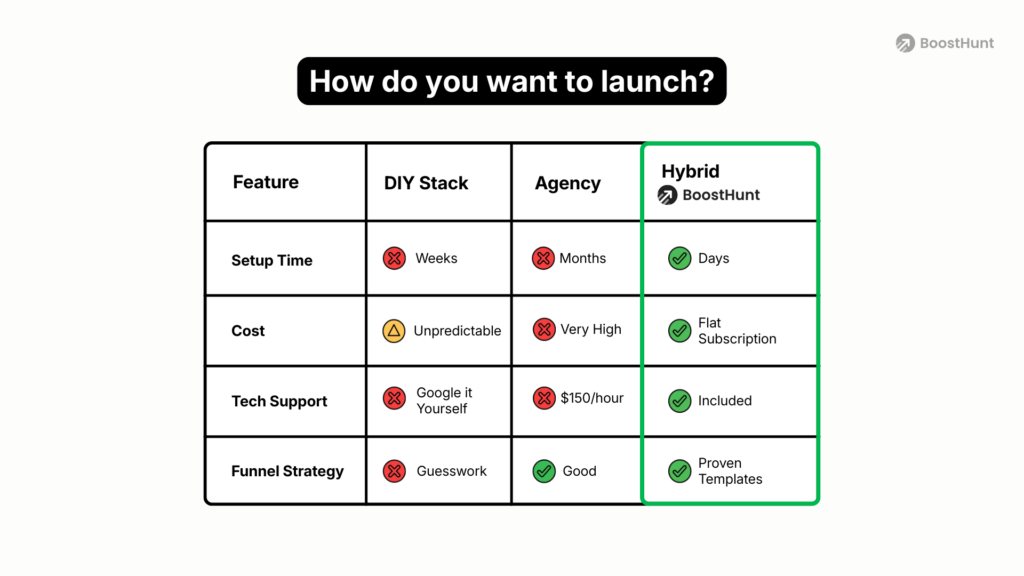
So what’s the alternative? Let’s break down the three main approaches and their true costs:
Path 1: DIY Platforms (Launching Without a Developer)
Best for: Creators who are tech-savvy, time-rich, and want full control
Real monthly cost: $150–$400
Upfront cost: $0–$100
Time investment: 100–200 hours for initial setup + 10–20 hours/month maintenance
Pros:
- Maximum flexibility and customization
- You own the entire system
- Lower entry barrier
Cons:
- High “Integration Tax”
- Constant maintenance and troubleshooting
- Steep learning curve
- High burnout risk
Example scenario:
This path fits creators who are former developers or have a strong technical background. They genuinely enjoy tinkering with tools and workflows. And they usually have 15–20 hours per week to dedicate to setup and optimization.
Path 2: Done-For-You Agencies
Best for: Established creators with budget and a clear offer
Real monthly cost: $300–$800 (retainer, if ongoing)
Upfront cost: $5,000–$25,000
Time investment: 5–10 hours (mostly content prep and approval)
Pros:
- Professional quality
- Zero tech stress
- Optimized for conversions from day one
- Fast launch timeline (2–4 weeks)
Cons:
- High upfront investment
- Less control over changes
- Ongoing costs if you need retainer support
Example scenario:
This path makes sense when you’ve already validated your course with a beta launch or 1-on-1 clients. You’re ready to scale and have $10k+ to invest in infrastructure. At this stage you want to focus 100% on content and marketing.
Path 3: Hybrid Platforms (Managed All-in-One)
Best for: Creators who want professional results without agency prices
Real monthly cost: $97–$249
Upfront cost: $0 (most offer free trials)
Time investment: 20–40 hours (content prep and review)
Pros:
- Unified ecosystem (no “Franken-Stack”)
- Done-for-you or guided setup
- Predictable monthly cost
- Low burnout risk
Cons:
- Less customization than full DIY
- Platform lock-in (migration can be complex)
- May lack niche features of specialized tools
Example scenario:
This path is ideal for creators launching their first or second course. They want professional infrastructure without spending $15k on an agency. Most importantly, they’d rather spend their time teaching than learning Zapier.
Examples of Hybrid & Managed Solutions:
BoostHunt (Disclosure: Our platform)
- All-in-one ecosystem: Course + Email + Store
- Unique Value: Includes done-for-you setup and funnel deployment at no extra cost
- Pricing: Free beta, then $97+/mo
- Best for: Creators who want professional setup without agency costs
Heights Platform
- Robust all-in-one with AI-powered features
- Setup: Mainly DIY with AI assistance; extensive manual customization often requires hiring experts ($1,000+)
- Pricing: $49–$199/mo (Comparable feature set starts at ~$99/mo)
- Best for: Creators who prefer DIY and want AI generation tools
Kajabi + Agency Services
- The industry standard for enterprise creators
- Setup: Requires hiring third-party “Kajabi Experts” for professional results
- Pricing: $3,000–$8,000 one-time (for setup) + Kajabi subscription ($149–$399/mo)
- Best for: Established creators with a large budget for premium done-for-you
Comparison Table
| Factor | DIY Platforms | Done-For-You Agency | Hybrid Platforms |
|---|---|---|---|
| Monthly Cost | $150–$400 | $300–$800 (retainer) | $97–$249 |
| Upfront Cost | $0–$100 | $5,000–$25,000 | $0 (free trials) |
| Setup Time | 2–6 months | 2–4 weeks | 3–7 days |
| Time/Week (Ongoing) | 10–20 hours | 1–3 hours | 3–5 hours |
| Tech Responsibility | 100% you | Agency handles | Shared (platform + light setup) |
| Burnout Risk | High (62% report burnout) | Low | Moderate |
| Customization | Maximum | High (within scope) | Moderate |
| Best For | Tech-savvy DIYers | Established, funded creators | First/second course launch |
(Data compiled from DDIY.co, CustomerHub 2025, and internal audits)
Our Take: There’s No “Best” Path—Only the Right Path for You
The Hidden Mental Cost Most Creators Ignore
If you’ve ever felt completely drained after fixing one more broken automation, you’re paying the Cognitive Tax I wrote about in this article: Course Creation Tech Fatigue in 2026: How to Launch Without a Developer.
After 10+ years building and optimizing creator tech stacks, here’s what I’ve learned:
The “cheapest” option is rarely the most profitable.
Not because the platform itself is bad, but because the hidden costs—in time, energy, and opportunity—quietly erode your margins and your motivation.
The real question isn’t “What’s the cheapest platform?”
It’s “What’s the total cost of ownership, and where do I want to spend my energy?”
When to Choose DIY:
- You genuinely enjoy tech and optimization
- You have 15+ hours/week for setup and maintenance
- You’re pre-revenue and want to minimize cash outlay
- You have specific needs that all-in-one tools don’t cover
When to Choose an Agency:
- You’ve validated your offer and have budget ($10k+)
- You want to launch in 2–4 weeks with zero tech work
- You value premium design and support
- Your time is worth more than the agency cost
When to Choose Hybrid:
- You’re launching your first or second course
- You want professional infrastructure without $15k upfront
- You’d rather spend your time teaching than troubleshooting
- You want predictable monthly costs
The Bottom Line
The “$39/month” pricing you see on landing pages is real—but it’s not the full picture.
When you add email marketing, checkout optimization, automation, and the 100+ hours of setup and troubleshooting, the true cost of a DIY course business is closer to $200–$400/month plus 10–20 hours/week of your time.
That’s not a criticism of DIY platforms. It’s just the reality of running a business.
Therefore, the key is going in with your eyes open—knowing the total cost (money + time + energy) and choosing the path that lets you focus on what you do best: teaching.
Because at the end of the day, your students don’t care whether you used Teachable or Kajabi or BoostHunt.
They care whether you helped them solve their problem.
And you can’t do that if you’re spending 20 hours a week debugging Zapier.
Next Steps
Want to see the real cost of your current (or planned) tech stack?
Use this simple audit:
- List every tool you use (or plan to use)
- Add up the monthly subscription costs
- Estimate hours/week spent on setup and maintenance
- Multiply those hours by your hourly rate (or desired rate)
- Add subscription cost + opportunity cost = Total Cost of Ownership
If that number makes you uncomfortable, it might be time to explore a different path.
Resources:
- DDIY Course Platform Cost Guide – Detailed breakdown of pricing tiers and transaction fees
- CustomerHub 2025 Platform Review – Data on creator time investment and “Integration Tax”
- Forbes: Creator Mental Health Study – Why 62% of creators report burnout
- A Brutally Honest Teachable vs Thinkific vs Kajabi Review – Analysis of creator margins across different pricing tiers.